
Knowledge Base
Articles In This Section
What Are Quickbase Dashboards Set Up Personalized Dashboards Using User-Filtered ReportsHow to Create a Dashboard in QuickbaseHow to add a Webpage Widget (embedded iFrame) to your Quickbase Dashboard?How and When to Use Calculated Columns for Quickbase Reports How to Create Summary Report in Quickbase Utilizing the Dashboard Side Bar | BEGINNERHow to Build an Operations Dashboard in Quickbase | INTERMEDIATE to ADVANCEDHow to Color-Coding Rows for Quickbase Reports Using Automations to Log Approval Time and User in QuickbaseHow to Create External Stakeholder Forms, Reports, and Dashboards in QuickbaseUpdating the Default Table Home Page and Default Report Columns | BEGINNEROrganizing & Assigning Groups To Reports | BEGINNERLinking Dashboards Together | BEGINNERHow to Create Reports and Charts in QuickbaseUsing Rich Text to make your Dashboard Pop | BEGINNERUsing Report Formulas as a Filter in a Report in QuickbaseHow to Create a Kanban Report in QuickbaseHow to Use Report Formulas as a Filter in a Quickbase ReportHow to Create an Audit or Change Logs with Automations Understanding and Setting Up Subscription Emails in Quickbase Create Audit/Change Logs with Automations | INTERMEDIATEHow to Create a Pie Chart in QuickbaseHow to Build Standard Reports in Quickbase | BEGINNERSections
Adding Reports to Dashboards | BEGINNER
When you are setting up a new dashboard or modifying an existing one, one of the best, most common, elements to put on your dashboard is a report.
Some of the benefits of putting reports on a Dashboard include:
✓ Efficiency and ease of use for your end users. Users don’t have to worry about losing a link or forgetting where/how to find their report
✓ Users have instant access to their information right when they log in to see what they should be working on or need to attend to
✓ Plain and simple, they make your dashboard look good
To start adding reports, you will have to get to the ‘edit’ screen for the particular dashboard you want to modify in one of two ways.
- If you are already on the dashboard you want to make changes to, click the ‘Customize This Page’ link in the right corner of your page (You can skip to step (5) if this is the case)
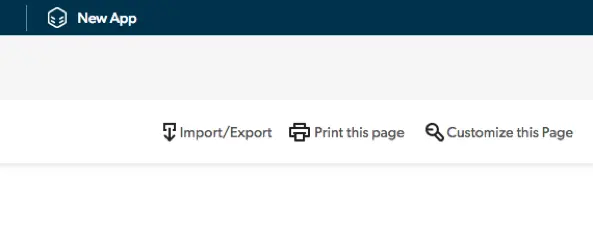
- If you are not already on the dashboard you want to make changes to, click the ‘Settings’ gear icon from the Home Screen of your application and follow the steps below.
- Select the ‘Pages’ link under the ‘User Interface’ column of the settings page
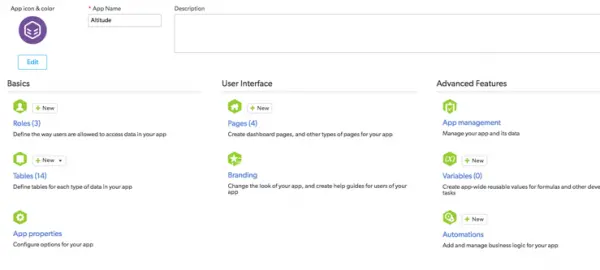
- Click the link of the particular Page you want to make changes to
- From the edit page of the Dashboard – hover over the ‘Report or Chart’ icon at the top of the page, click and drag the icon into the white area of the page, move it around until you find the place you want to drop it, then un-click.
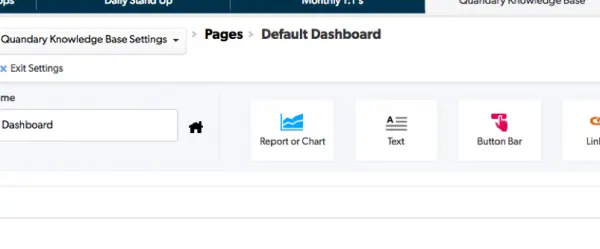
A new empty report widget will be added (see image below) on the page where you dropped it.
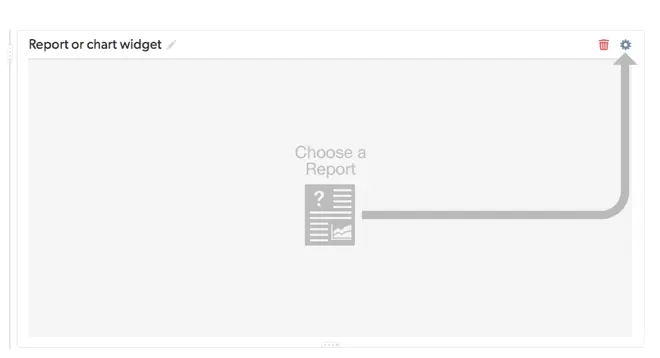
- On your new report widget – click the gear icon where the arrow is pointing. You will be presented with a drop-down list similar to below. Search and locate the report you want to place here, select it, and watch the report load on your dashboard.
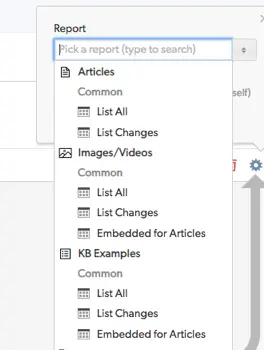
- By default, Quick Base will title this widget with the report name – see the ‘List All’ title on the report widget above. To change the title, hover your mouse next to the title, where a Pencil Icon will appear. Select the Pencil and enter in the new title you would like to label this widget as to ensure it makes sense to your users.
- Repeat these steps to add additional reports that you want to appear on this dashboard. When you are done, make sure to ‘Save’ the dashboard in the upper right-hand corner.
- A ‘Grid Edit’ type report cannot be placed on a dashboard.
- There is a limit of 9 report widgets per dashboard
- You cannot use a Personal Report on a dashboard.
- Incomplete Reports, meaning any of those that have an ‘ask the user’ component, cannot be used on Dashboards.
For more about report types and whats possible – read through the full list of reports here.
- Author: Chayce Duncan
- Email: chayceduncan@quandarycg.com
- Date Submitted: 12/10/2018


Industries
Resources


© 2026 Quandary Consulting Group. All Rights Reserved.
Privacy Policy