
Knowledge Base
Articles In This Section
How to Create a Code Page in Quickbase What is QuickbaseHow to Navigate the 'My Apps Page' in QuickbaseHow to Manage and Delete Reports in QuickbaseHow to Use Application Diagram in Quickbase Copying Quick Base App ComponentHow to Create Cross-App Relationships in QuickbaseHow to Create a Code Page in Quickbase How to Create Cross-App Relationships in QuickbaseMany-to-Many Relationships in QuickbaseMany-to-Many Relationships in QuickbaseHow to Set Up Reminders in Quickbase | BEGINNERSections
Quickbase Knowledge Center
Getting Started in QuickbaseFields & Formulas Reporting & DashboardsNotifications & Subscriptions Roles & PermissionsTablesFormsQuickbase PipelinesQuickbase APIMaintenance & Monitoring
WorkatoOutside of the Quickbase BoxQuickbase NewsPipefy NewsWorkato NewsAI Knowledge CenterPipefy Knowledge CenterChanging The Record Title Seen On Forms Beginner
June 19, 2019
The Record Title appears in the header section of any given table and is used to identify the record you are viewing.
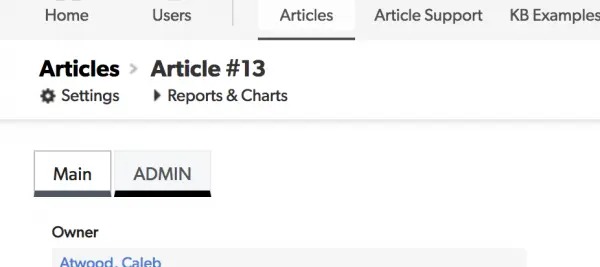
By default, the title will display the Record ID#.
This can be useful for some tables. But more often than not, you'll want to display more relevant information about the record.
How to change the Record Title:
- From the table you want to update, navigate to Settings > Advanced Settings and scroll to Identifying Records > Record Title
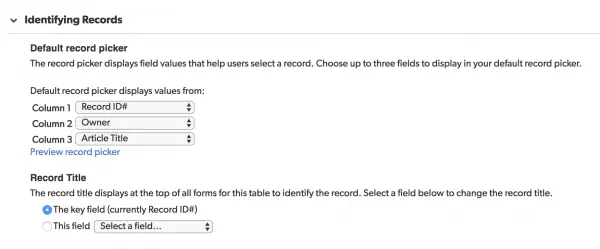
- To pick a new field for Record Title, click the “This field Select a field…” radio button and choose the field you want to use.
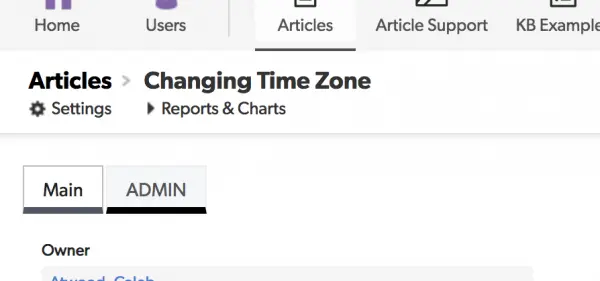
In this example, we will be using Article Title.

- Click Save to update your changes. When you go back and view a record you will see the updated title.
Before:
After:
For more on customizing application preferences, take a look at our article about Updating the Default Table Home Page and Default Report Columns.
- Author: QCG Development Team
- Email: dev@quandarycg.com
- Date Submitted: 1/29/2019


Resources


© 2026 Quandary Consulting Group. All Rights Reserved.
Privacy Policy